
CopySafe PDF Protection : Copy Protection for PDF
Lock Down Your Intellectual Property With Confidence
Specially designed to copy protect PDF documents and eBooks, CopySafe PDF provides incomparable copy protection with the most robust DRM to prevent sharing and unauthorized distribution.
Distribute CopySafe PDF files for desktop reading by email, download and on USB using DRM that enables total control over all aspects with immediate effect on any changes made, even on PDF already downloaded and saved to a user's computer, or still out in the wild on disk. Or display on web pages using one of our CMS plugins for WordPress, Drupal, Joomla and Moodle.
- 📑 Copy protection and security features
- 📑 Watermark protection
- 📑 Scope and scenarios
- 📑 PDF encryption software
- 📑 Online demos for evaluation
- 📑 Test drive DRM for CopySafe PDF
- 📑 Software downloads
- 📑 Plugins for CMS websites
- 📑 Tutorial videos
- 📑 CopySafe PDF licensing
- 📑 Order CopySafe PDF software
- 📑 Rent the CopySafe PDF DRM Portal
- 📑 Benefits of using Copysafe Video
- 📑 FAQ
Copy Protection & Security Features
The CopySafe PDF Reader provides the most advanced copy protection for PDF today - especially designed to stop piracy and control user access rights.
- ✅ Military-Grade Encryption – Ensures PDF files cannot be extracted, modified, or reverse-engineered.
- ✅ PrintScreen & Screen Capture Blocking – Prevents copying via PrintScreen and thiid party screen grabbers.
- ✅ Password & DRM Access Control – Choose between simple password protection or advanced DRM to prevent sharing and unauthorized use.
- ✅ Printing Controls – Block printing entirely or limit the number of prints allowed per user.
- ✅ Expiry & Access Limits – Expire documents by date, by number of days/hours, or limit views to a specific count.
- ✅ Device Locking – Lock PDFs to 1–3 authorized computers using unique fingerprint IDs.
- ✅ Group & Individual Management – Assign permissions by user groups, tokens, or individual accounts.
- ✅ Multi-Language Support – Works with both left-to-right (LTR) and right-to-left (RTL) languages.
- ✅ OS Support – Online reading for all computers and devices including Windows, Mac, iOS and Android phones.
- ✅ Online DRM Portal – Included free with every license for subscriber management, usage tracking, and instant policy changes
- ✅ Integrated eBook Store – Option to sell protected PDFs directly with automated subscription and licensing controls.
With these features, CopySafe PDF goes far beyond traditional password protection. It provides unbreakable copy protection for PDF documents, making it the solution of choice for industries where data security is mission-critical.
Watermark Protection
Watermarking doesn't actually prevent copy but it is a most useful deterrent, because and copies can display the identity of the offender. A static watermark can be added at the time of encryption for Copyright notices, or a dynamic watermark can be added for web page display that shows the user's name, IP address, and email if so desired.
Scope & Scenarios
The CopySafe PDF software provides different output types:
- Copy protect PDF for download and desktop reading with password and/or expiry date.
- Copy protect PDF for download and desktop reading with DRM to prevent sharing and unauthorized distribution.
- Copy protect PDF on your web pages using domain lock.
- Copy protect PDF on USB or DVD.
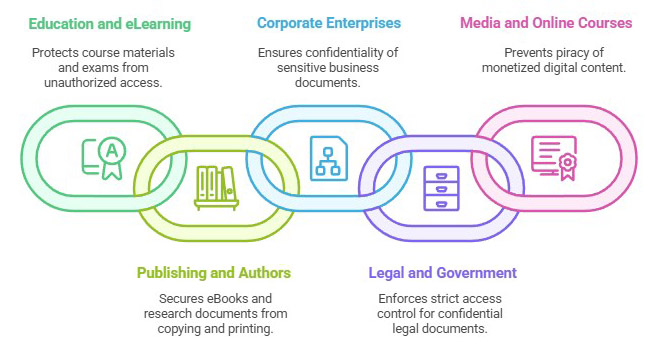
CopySafe PDF is trusted across industries where the security of digital documents is directly tied to revenue, compliance, and reputation. Some of the most common applications include:
- Education and eLearning
– Schools, universities, and online training providers rely on CopySafe PDF to protect course materials, exam papers, and study guides. With DRM controls, educators can prevent unauthorized sharing and limit access to enrolled students only. - Publishing and Authors
– Writers, independent publishers, and research institutions use CopySafe PDF to secure eBooks, whitepapers, and research documents. Unlike basic password protection, CopySafe PDF prevents copying, printing, and screen capture, ensuring that intellectual property remains intact. - Corporate Enterprises
– Businesses often distribute sensitive reports, financial statements, or client contracts in digital format. CopySafe PDF ensures these files remain confidential and accessible only to approved employees or stakeholders. - Legal and Government
– Law firms and government agencies handle highly confidential documents where unauthorized sharing could have serious consequences. CopySafe PDF enforces strict access control, auditability, and protection against leaks. - Media and Online Courses
– Content creators who monetize tutorials, training modules, or certification programs can protect their work from piracy. CopySafe PDF ensures that content cannot be redistributed on file-sharing platforms, preserving both credibility and income.
By addressing the needs of these industries, CopySafe PDF has become the preferred choice for organizations and individuals who require unbreakable PDF copy protection software.
PDF Encryption Software
The CopySafe PDF Protector software is easy to use. Simply nominate the desired distribution type, and follow the prompts to completion.
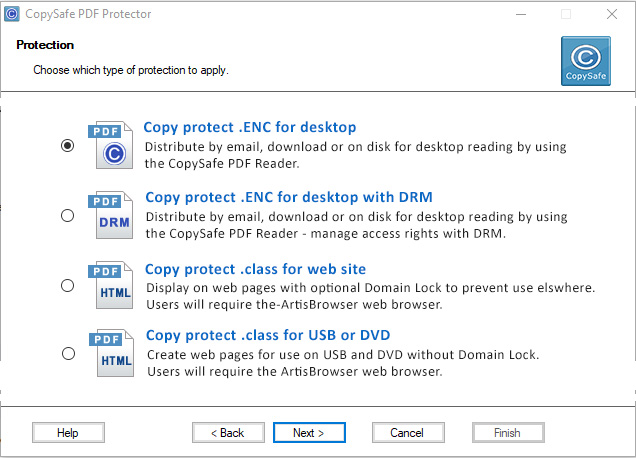
All possible scenarios are covered - from desktop reading to online reading, with options for DRM - even offline DRM for collections saved to USB (requiring no Internet).
Online Demos For Evaluation
Some authors prefer to provide downloads for desktop reading with options for DRM, but others like to display their protected PDF on web pages and let their website membership/login system manage access rights. Some examples using the popular CMS:
- Click to visit a Drupal website.
- Click to visit a Joomla website.
- Click to visit a Moodle website.
- Click to visit a WordPress website.
DRM Evaluation - Free Trial
Here you can evaluate our DRM portal for free for 14 days.
Although a Demo Account doesn't include all of the for group, subscriber and token management, you can still experiment with the different protection settings and send test documents to friends to see how effective our DRM really is. The DRM portal can be managed from any device that can access the Internet - from any computer or mobile device. Click to create your Demo DRM account now.
Software Downloads
Here you can download the free readers and a trial version of the CopySafe PDF Protector:
 |
CopySafe PDF Protector PDF encryption software |
Download |
|
CopySafe PDF Reader PDF reader for desktop reading |
Download |
 |
ArtisBrowser Online reader for all OS/devices |
Download |
The CopySafe PDF Reader is free software that be distributed with your protected PDF on USB. ArtisBrowser is also free software that can be downloaded for all operating systems (OS) including Windows, Mac OSX, iOS and Android phones.
Plugins for CMS Websites
These free add-ons will enable you to upload and display copy protected PDF on your web pages from your online page editor:
 |
DNN Module | Download |  |
More info | ||
 |
Drupal Module | Download | |
More info | ||
 |
Joomla Extension | Download | |
More info | ||
 |
Moodle Plugin | Download | |
More info | ||
 |
WordPress Plugin | Download | |
More info |
Tutorial Videos
CopySafe PDF Licensing
Unlike other services that charge an annual support fee, CopySafe PDF Protector software is a one-time fee with that includes:
- Free support by email for life.
- Free software upgrades for life.
- Free use of the DRM portal to manage an unlimited number of groups, subscribers and documents.
- Free use of the CopySafe online store to sell your PDF as ebooks free of commission
- Free use of the online cover design tool - integrated with your DRM account and online store.
Alternatively, the PDF DRM portal service can be rented to use the online version of the Protector software - monthly fee applies.
Purchase CopySafe PDF Software
The licensing for the CopySafe PDF Protector software is per computer (the one used to encrypt your PDF). The order form will calculate the discount for multiple licenses.
Rent the CopySafe PDF DRM Portal
An alternative to Purchasing is Renting
No software is required. When renting the Copysafe PDF DRM service, you have unlimited use of the online version of the Protector software which can be used from any device including a mobile phone. The DRM service can be rented per month or by usage (views of your documents).
For a complete price list, see DRM Service Rental
Benefits Of Using CopySafe PDF
| Category | Unprotected PDF | CopySafe PDF |
|---|---|---|
| Accessibility | Open access for all web browsers and search engines. | Copysafe Reader or ArtisBrowser only; invisible to bots. |
| Copy Protection | Content is vulnerable to all methods of copy and save. | All methods of copy are prevented. |
| App Requirements | Supports all standard browsers (Chrome, Safari, etc). | Requires ArtisBrowser or CopySafe Reader. |
| Tracking Capabilities | Prone to data scraping and packet sniffing. | Total immunity to automated data miners. |
| Web Page Compatibility | Universal compatibility across all devices. | Use ArtisBrowser on Win, Mac, iOS, and Android. |
| Implementation | Easy setup using standard HTML/CSS. | Plugins for WordPress, Drupal, Joomla and Moodle. |
Frequent Questions and Answers
- How does CopySafe PDF compare to other secure document solutions?
CopySafe PDF is beyond comparison because it provides protection from ALL avenues of copy, sharing, extraction, decompilation and unauthorized distribution.
- Can CopySafe PDF be opened by Adobe PDF Reader and others?
No. Adobe and other PDF readers are generic readers and as such are not secure. The CopySafe PDF Reader and ArtisBrowser are the only apps than can decrypt the CopySafe files, making CopySafe PDF the most secure document solution on the planet.
- Can the CopySafe PDF Reader be distributed with my documents?
Yes. The CopySafe PDF Reader is a free download to the public. However we recommend providing the link to download from our server so that the latest version is always available.
- Does CopySafe PDF encryption increase a document's file size?
No. Although CopySafe PDF uses military grade encryption, there is no increase in file size.
- Can CopySafe PDF documents be searched from the Internet?
Absolutely not. The content of a CopySafe PDF document is protected and only accessible to authorized users while using the CopySafe PDF Reader or ArtisBrowser.
- What type of files can be protected by CopySafe PDF?
Any type of document file that can be converted to PDF. However PDF with embedded video and music is not supported. In fact a good rule of thumb is export/save the PDF for Adobe Reader version 8.0 or earlier as later effects and tricks are dependent on JavaScript and CSS that may only be supported in the latest versions of Adobe Reader.
- Are hyperlinks and bookmarks supported?
Yes. Bookmarks within the document are supported and hyperlinks to resources on the Internet are also supported. But bookmarks linking between separate documents are not supported.
- Can I use CopySafe PDF with DRM in an intranet or corporate network?
Yes. The CopySafe PDF DRM portal software can be purchased and installed on a Windows server making your DRM service completely in-house and independent.
- Can CopySafe PDF be displayed on web pages?
Yes and we do provide modules for all popular CMS like WordPress, Drupal, Joomla and Moodle.
- Can CopySafe PDF be read on all devices and OS such as modile phones?
Yes and No. Copysafe PDF provides different output for desktop reading and online reading. For desktop reading (optional DRM) the Copysafe PDF Reader is required which is Windows only. But for online reading the ArtisBrowser is required and that is available for all OS including Windows, Mac, iOS and Android phones.


