
SafeGuard WebMail: Copy Protect Mail
The best advice for your scenario?
 SafeGuard WebMail provides the most secure mail protection on the planet. In fact there is nothing else like it. SafeGuard WebMail is safe from all copy, and messages including media attachments, are protected from sharing and unauthorized distribution.
With a SafeGuard WebMail account you can manage recipients and groups to send secure email without the fear of your messages ever falling into the wrong hands. SafeGuard WebMail is safe in transit and cannot be accessed by your Internet Service Provider (ISP) because nothing actually leaves the SafeGuard Media server. Nor can the staff of the data center hosting the SafeGuard Media server read your messages because they are encrypted and restricted for author and recipient access only.
Requirements
ArtisBrowser is the only app that you need to send and read SafeGuard WebMail messages.
Usage Scenarios
SafeGuard WebMail is ideal for team messaging or private tuition where the privacy and security for intellectual property is paramount. Each admin/author can create an unlimited number of groups, users and messages which are published as webmail and can include HTML and embedded PDF, video, images and zip files as attachments.
Subscription Sales
Sell subscriptions online from any web page or Facebook post. Add products for the link to use on any web page to sell your ebooks and tutorials free of commission or advertising fees. All you need is your own PayPal account and your customers can use any credit card without subscribing to Paypal.
How it Works
All messages and attached media is accessed via ArtisBrowser. Nothing leaves the server except the notification of new messages (if required) to the recipient's normal email address.
Whether a tutor or team leader you can create messages assigned to Teams/Groups that can be accessed by each user in those Teams/Groups, or you can send messages to specific recipents. Recipients can reply and follow discussions with anyone that was included as a TO or CC recipient. It all starts with the Team leader who can keep it one-one one by using BCC or they can include others as required by using CC... each user's contact list begins with only one contact for their welcome message, and additional contacts are added automatically when found as either a TO or CC recipient for a message.
User Management
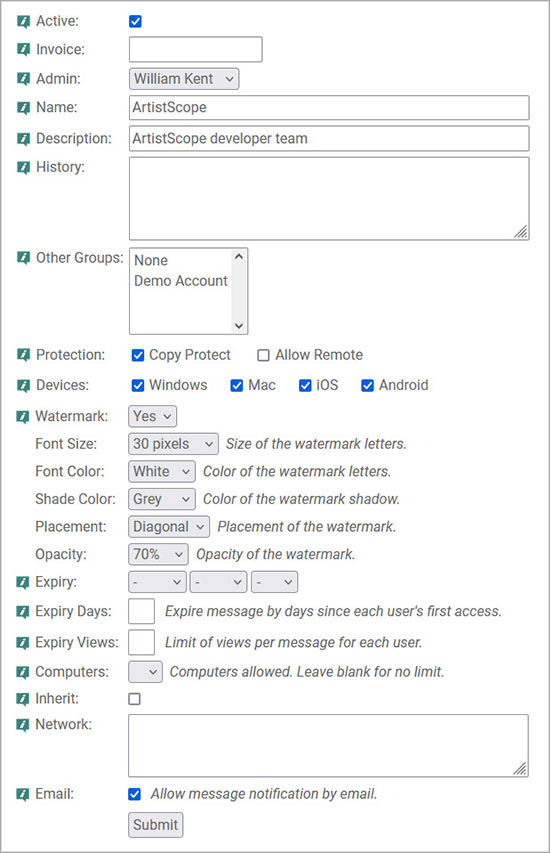
User access can be governed by Group settings and/or individual settings to include:
- Access to messages/pages assigned per Group with whitelisting for associated groups/courses.
- Groups and users can be expired by calendar date.
- Access to messages limited by expiry date, expiry by days or expiry by views.
- QA responses easily managed from stats and notifications for time read by each recipient.
- Send messages like normal Webmail using TO, CC and BCC protocols.
- Edit/recall sent messages at any time.
- Any changes to messages or user/group settings have immediate effect, even on messages already in Inboxes.
- Limit use access by network address or IP range. Ideal for intranets.
- Watermarks can be applied to message pages, including attached PDF and video.
- Sell subscriptions using a link on any web page free of commission and fees.
Access Rights
Only the author of the message and the author's prescribed recipients (per message) will even know that a message exists. In any case only the author and those prescribed recipients will ever be able to open and read SafeGuard Webmail messages.
Copy Protection
SafeGuard WebMail utilises the most secure copy protection for web media on the planet:
- Access to messages/pages assigned per Group with whitelisting for associated groups/courses.
- Messages are DRM protected for access limitations that cannot be shared or spoofed.
- Messages on display are most securely protected from all copy techniques including PrintScreen and recording.
- Nothing leaves the SafeGuard WebMail server and the user's view is "read-only".
- Only ArtisBrowser can decrypt and display the encrypted messages. Other browsers get nothing.
- Nothing can be gained by view-source and packet-sniffers get nothing.
SafeGuard WebMail Pricing
Pricing for the SafeGuard WebMail service is based on user count:
- Account setup fee is US$25 (non-refundable).
- At the end of the month (first day of the new month) your account will be billed $1/user in your account base.
- An invoice will be emailed with 14 days to pay.
- Payment can be made online by Paypal or credit card.
- Failure to pay a bill within 14 days will result in immediate suspension of the account and parts thereof.
- Use of this service requires full agreement to our Terms of Service.
- Click to purchase a Team account.
Free Demo Account
Demo accounts can be registered for the SafeGuard WebMail service with access for 14 days:
- Demo accounts expire in 14-days from start date.
- Contact-lists are limited in that new users cannot be added. However messages can be sent to Self or our Accounts, Sales or Support team.
- Use of this service requires full agreement to our Terms of Service.
- Click to register a demo account.
Team Settings
User Guide
Click to download the user-guide for SafeGuard WebMail in PDF format.


