
ArtistScope Site Protection Software (ASPS) : Website Protection
 ArtistScope Site Protection Software (ASPS) provides the most robust and most secure
website security and copy protection for all web page media,
safe from all copy including screen capture, download, scraping, etc.
In fact ASPS provides the most secure solution for data security and
the prevention of data loss and plagiarism ever imagined.
ArtistScope Site Protection Software (ASPS) provides the most robust and most secure
website security and copy protection for all web page media,
safe from all copy including screen capture, download, scraping, etc.
In fact ASPS provides the most secure solution for data security and
the prevention of data loss and plagiarism ever imagined.
How ASPS Protects Website Content
The ASPS server module is installed on the web server (Apache or
Windows) to deliver encrypted web pages from your web site that only
the ArtisBrowser can interpret and display, creating a secure tunnel
between website and the user's web browser in which no data or media
can be copied or extracted by any means, not even from browser cache
or memory.
ASPS Comparison
ASPS is most unique in that there is nothing else like it. Why it is unique is because it does not depend on popular web browsers that are useless for copy protection. However it does require a dedicated server or VPS which may be too technical for the average site owner. But as of May 2023 even websites on shared hosting servers can use our ASPS service in an iFrame managed by an add-on for CMS like WordPress. For more on these new ASPS services please see the SafeGuard Website Protection solutions.
ASPS Protection Features
All media displayed on an ASPS web page can be copy protected most securely:
- Prevent all copy, save, download, screenshots and screen recording.
- Control print and copy protection per individual page.
- Media links cannot be obtained by scraping or view of page source.
- Data cannot be extracted from browser cache or memory.
- Can be used on all websites, ie: Apache, Nginx and Windows IIS servers.
- Identify users by their unique Computer ID for DRM management.
- Data is protected from extraction by data miners and packet sniffers.
- Supported across all OS including Windows, Mac, Android and iOS.
Who Benefits The Most By Using ASPS?
Anyone who can afford the extra cost of a virtual web
server, which is not much these days as VPS can now be rented for $10/month
and less. ASPS provides the most secure copy protection for all web page media that cannot be copied or exploited in any way, short of
taking a photograph of the computer monitor itself. See how to copy protect live
video stream.
Copy Protecting Video With ASPS
Any media displayed on your web page will be copy protected and you can use any video file format or embedded player that you like. You can even embed live streams and video from media services like Vimeo. For examples of protected video displayed in your favorite CMS such as WordPress, Moodle, etc please visit one the demo sites listed below.
Copy Protecting PDF With ASPS
Any media displayed on your web page will be copy protected but with PDF you need to be careful not to provide options for print, download, etc. For example, simply embedding the PDF will enable Adobe Reader support which provides options that cannot be disabled. However by using a PDF JS viewer the PDF is dissembled and displayed as HTML. It still looks like an embedded PDF but you have the option of removing the toolbar options for download, print and save. For examples of protected PDF displayed in your favorite CMS such as WordPress, Moodle, etc please visit one the demo sites listed below.
Copy Protecting Images And Text With ASPS
Anything displayed on your web page will be copy protected, making text, images and database results safe from all copy and extraction, even from cache and view-source. For example, simply embedding the PDF will enable Adobe Reader support which provides options that cannot be disabled. However by using a PDF JS viewer the PDF is dissembled and displayed as HTML. It still looks like an embedded PDF but you have the option of removing the toolbar options for download, print and save. For examples of protected PDF displayed in your favorite CMS such as WordPress, Moodle, etc please visit one the demo sites listed below.
ASPS Server Requirements
Any version of Apache, Nginx or Windows IIS server is suitable. However a dedicated server or VPS is required to have the permission to install software at system level. Installation is always performed by ArtistScope to ensure that the filter module is suited to the server OS version and that it is properly licensed for the intended web site/s. Self install is not an option.
ASPS Online Demos
To review and evaluate the effect of
ASPS protection on various types of web site that use CMS, the
following demo sites are available:
 |
Drupal Demo Site | Visit Now | ||
 |
Joomla Demo Site | Visit Now | ||
 |
Moodle Demo Site | Visit Now | ||
 |
WordPress Demo Site | Visit Now |
* Or you can view any web page copy protected via our ASPS Mirror.
Test Your Web Page Via Our ASPS Mirror
Click to try the demo for Copy Protect Any Web Page Hosted Anywhere. Our ASPS Mirror is most unique in that it can retrieve and deliver a web page for review in the ArtisBrowser. Any type of web page can be mirrored and copy protected in. However while the web page will be copy protected, any pages clicked through from that page will not be protected. Also, if you visit that page directly it will not be protected. Only the page that we display in the demo will be copy protected. The ArtisBrowser is required for this demo. Try it and see for yourself why ArtistScope copy protection software is incomparable.
ASPS Site Protection Tutorial Videos
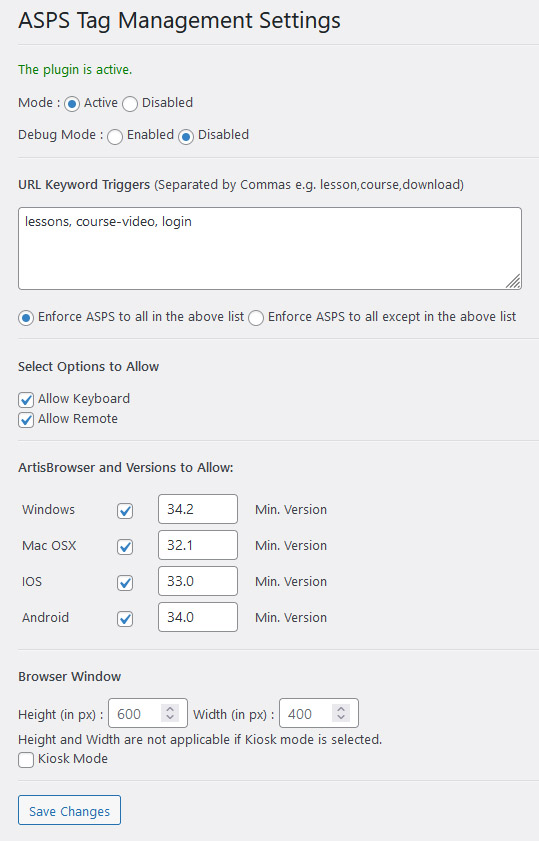
ASPS Meta-Tag Management Plugins
The selection of web pages that
you want to protect and the copy
protection settings to apply to
those pages is governed by meta-tags that you can add.
However that task is very
much simplified by using a plugin for your CMS that can add your
ASPS meta-tag selection to existing web pages on the fly and
nominated which pages for your secure web site are to be protected without editing those pages
directly. Our
ASPS Tag Management plugin
is available for Drupal, Joomla, Moodle and WordPress websites.
|
Drupal Module |
 |
|||
|
Joomla Extension | |
|||
|
Moodle Plugin | |
|||
|
WordPress Plugin | |
These plugins require that ASPS is installed to be of any use. ASPS licensees can request the plugin suited to their CMS.
Download the ArtisBrowser Secure Web Browser
ArtisBrowser is a free download to the public and
available for all popular OS and devices. While
it includes similar functionality to the popular web browsers, usage requires
full agreement with this
User Agreement. ArtisBrowser can be used with any type of web site or web application
regardless of the programming language used. Click to
download
ArtisBrowser for your device.
Purchase ASPS Server Software
Administrator rights to a dedicated or virtual server is required for ArtistScope to install this solution. ASPS software is supported on all Apache and Windows servers. Licensing is a one-time purchase per server and can include all aliases and sub-domains of a domain if they are hosted on the same server.
Frequent Questions and Answers
- Does ASPS site protection include DRM features like with CopySafe PDF?
No. Because most web sites today use a CMS like Drupal or WordPress to manage user accounts and logins. So it is best to use those existing features, use a custom add-on or modify the user management system already in place. However the ArtisBrowser does provide the unique Computer ID for each user that can be used to lock computers to individual accounts. - Can ASPS protected web pages be searched via Google?
No. Only the ArtisBrowser can decode and read ASPS web page content. This is by design as copy protected content needs to remain impenetrable. - How does ASPS download speed compare with normal content?
Apart from the fact that content is not cached, download speed will be the same for any first visit to a normal web page. The software has been designed and tested for high volume traffic with no apparent loss of performance or extra demand on a web server. - Can our own developers install this ASPS web security solution?
No. When installed by ArtistScope the server licensing is guaranteed to work and the selection of server filter guaranteed to work for your server type. For example Apache can come in many different flavors and the various control panels installed by web hosts can alter their configuration. So when the ArtistScope team installs the filter, if an odd/new server distribution/configuration is encountered, our team can rebuild the filter software to suit and thus ensure that your web security solution is ready to use. - Our corporate network uses Firefox or IE. Can these
web browsers be used?
No. Only the ArtisBrowser can decrypt the encrypted page data and display according to the protection level set for each page. - Which programming languages are supported by ASPS
site protection?
All of them. The ASPS filter encrypts and delivers the final web page, which is the HTML already assembled by your server side code. So it doesn't matter if your site uses ASP.Net, PHP, Ruby or beetle juice to create your web pages. - Can the ArtisBrowser be used on a terminal server?
No. This is not recommended at all because if a user on the same server visits a protected page SQL server functions will stop. ASPS server software can be used on any server, but use of the ArtisBrowser to visit that content must done from a separate server, computer or virtual partition.
- Can I test the ASPS website protection on my server before purchase?
No. ASPS website protection requires software to be installed at server level by our support team. However you can use the Protect-Anywhere demo to mirror any web page via our ASPS server. But note that any sites like Vimeo will have protection in place to prevent mirroring of their content. - Can the ArtisBrowser be used on all devices and OS such as phones?
Yes. As of April 2021 the ArtisBrowser is available for all Windows, Mac, Android and iOS devices. - What are the alternatives for a copy
protected web site?
Nothing that compares. However the CopySafe solutions can provide copy protection for Images, PDF and Video but they are limited in that a Windows computer is required to view them.


